

In today’s distributed cloud environments, securely managing secrets and credentials is more than an operational requirement — it’s a strategic necessity. HashiCorp Vault has long been a go-to solution for teams that need fine-grained control over secrets, encryption keys, and dynamic credentials.
But to ensure Vault can withstand node failures, database crashes, or network interruptions, deploying it in High Availability (HA) mode is critical. One of the most reliable storage backends for this purpose is PostgreSQL, thanks to its robust replication features and proven consistency guarantees.
In this article, we’ll walk through how to configure Vault with PostgreSQL as a storage backend in HA mode — covering architecture, configuration, security best practices, and failover validation.
Understanding Vault’s High Availability Architecture:
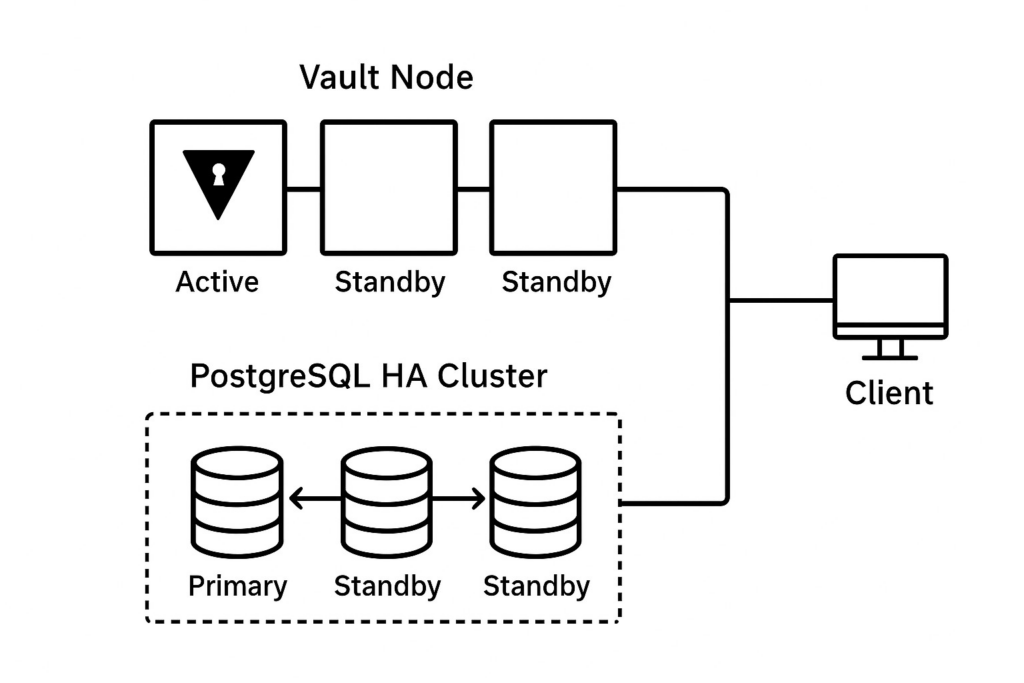
By default, Vault can operate in standalone mode or HA mode. In HA deployments:
- One Vault node becomes Active, handling all client requests.
- Remaining nodes run in Standby mode, constantly syncing state.
- If the active node fails, one of the standby nodes automatically takes over — with minimal downtime.
To enable this mode, Vault requires a backend capable of leader election. Consul or Vault’s Integrated Storage are often used, but PostgreSQL can also play this role with some configuration tweaks.
PostgreSQL ensures:
- Data persistence across all Vault nodes.
- Transaction integrity even under high load.
- Automatic failover when configured with replication tools like Patroni, PgBouncer, or RDS Multi-AZ.
Why Use PostgreSQL as Vault’s Backend:
While Vault’s built-in Raft backend is great for simplicity, PostgreSQL offers additional advantages:

Managed DB options (AWS RDS,
Azure Database, Cloud SQL)
reduce operational overhead.

Centralized operations if your team
already relies on PostgreSQL for
application data or audit logs.

Encryption at rest and TLS
in-transit built into most
managed PostgreSQL offerings.

HA and replication capabilities
ensure resiliency and fault tolerance.
Prerequisites
Before getting started, ensure you have the following components prepared:
1. A Running Kubernetes Cluster
This can be:
- Minikube (for local testing), or
- A managed Kubernetes service such as Azure AKS, Amazon EKS, or Google GKE.
- kubectl and Helm v3+ installed and configured to communicate with your cluster.
- (For AKS/EKS/GKE) Sufficient cluster node resources to run at least 2 Vault pods for HA.
2. Vault Requirements
- HashiCorp Vault v1.13+, deployed using the official Helm chart.
- TLS certificates configured for Vault’s HTTP listener
- Self-signed certs are fine for local testing on Minikube
- Use proper CA-signed certs for production AKS/EKS/GKE setups
3. Azure Database for PostgreSQL
- An Azure Database for PostgreSQL Flexible Server instance running version 13+.
- HA enabled (Azure’s Flexible Server automatically supports zone-redundant HA if enabled at creation time).
- A database and user created specifically for Vault with appropriate permissions.
- VNet rules updated to allow inbound traffic from:
- Your Kubernetes nodes (AKS), or
- Minikube VM IP (if running locally with public PostgreSQL), or
- A Private Endpoint (recommended for production AKS deployments).
4. Connectivity & Security
Ensure connectivity from the Vault pods to PostgreSQL on port 5432:
- For Minikube: allow outbound traffic to PostgreSQL’s public IP or tunnel.
- For AKS/EKS/GKE: ensure NSGs/firewalls/security groups allow access.
- TLS enabled for PostgreSQL connections (Azure PG enforces TLS by default).
- Store Azure PostgreSQL credentials securely (e.g., in Kubernetes Secrets or external secret managers).
Step 1: Configure PostgreSQL for HA
Vault uses PostgreSQL’s connection string to communicate with the database, so you’ll want a virtual endpoint that stays reachable even if a primary fails.
1. Create a dedicated database and user for Vault:
SQL
CREATE DATABASE vault;
CREATE USER vault_user WITH ENCRYPTED PASSWORD 'SuperSecret123!';
GRANT ALL PRIVILEGES ON DATABASE vault TO vault_user;
2. Create the required database schema
The PostgreSQL storage backend does not automatically create the table. Here is some sample SQL to create the schema and indexes:
SQL
CREATE TABLE vault_kv_store (
  parent_path TEXT COLLATE "C" NOT NULL,
  path TEXT COLLATE "C",
  key TEXT COLLATE "C",
  value BYTEA,
  CONSTRAINT pkey PRIMARY KEY (path, key)
);
CREATE INDEX parent_path_idx ON vault_kv_store (parent_path);
3. Create the HA locks table
Store for HA-Enabled backend:
SQL
CREATE TABLE vault_ha_locks (
  ha_key                                   TEXT COLLATE "C" NOT NULL,
  ha_identity                              TEXT COLLATE "C" NOT NULL,
  ha_value                                 TEXT COLLATE "C",
  valid_until                              TIMESTAMP WITH TIME ZONE NOT NULL,
  CONSTRAINT ha_key PRIMARY KEY (ha_key)
);
4. Harden access
Restrict Vault connections via pg_hba.conf and enforce TLS.
Step 2: Create Kubernetes Secrets
We would create a secret for backend-connection-url which will later be used in the deployment of Vault.
Connection URL format should be:
VAULT_PG_CONNECTION_URL='postgres://$DATABASE_USER:
$DATABASE_PASSWORD@$DATABASE_HOST:5432/$DATABASE_NAME'
Execute the following commands:
$ kubectl create namespace vault
$ kubectl create secret generic postgres-backend-connection-url \
  --from-literal=VAULT_PG_CONNECTION_URL='postgres://$DATABASE_USER:
$DATABASE_PASSWORD@$DATABASE_HOST:5432/$DATABASE_NAME' \
  -n vault
Step 3: Install Vault Using Helm
$ helm repo add hashicorp https://helm.releases.hashicorp.com
$ helm upgrade --install vault hashicorp/vault \
  --namespace vault \
  -f values.yaml
Configuration
Under storage > ha > config in your values.yaml, add the following:storage "postgresql" {
connection_url = "{{env "VAULT_PG_CONNECTION_URL"}}"
ha_enabled = "true"
}Step 4: Initialize and Unseal Vault
1. Check pod status
After the successful installation you should see 3 vault pods running in vault namespace. Since we have not yet initialized vault, we would see them running but not ready.
$ kubectl exec -it vault-0 -n vault -- vault operator init2. Access the Vault UI
Now Vault is working all fine. We can also check the UI. We will be using simple port-forward this time, else you can configure an ingress of your choice.
$ kubectl get svc -n vault
$ kubectl port-forward svc/vault-svc 8200:8200 -n vault
3. Verify the status
$ kubectl exec -it vault-0 -n vault -- bin/sh
$ vault status
Key                     Value
---                     -----
Seal Type               shamir
Initialized             false
Sealed                  true
Total Shares            0
Threshold               0
Unseal Progress         0/0
Unseal Nonce            n/a
Version                 1.20.1
Build Date              2025-07-24T13:33:51Z
Storage Type            postgresql
HA Enabled              true
Step 5: Test Failover Behavior
Simulate failover by stopping the active node or forcing PostgreSQL primary failover. Vault standby
nodes should automatically promote to active and reconnect to the new DB writer endpoint.
Testing steps:
- Identify the active Vault node
- Terminate the active pod or simulate network failure
- Observe automatic promotion of standby node
- Verify client requests continue without interruption
- Check logs for leader election events
Step 6: Security Best Practices
1. Enable TLS Everywhere
Ensure all communication channels are encrypted:
- Vault to PostgreSQL connections
- Client to Vault API
- Inter-node Vault communication
2. Rotate Database Credentials
Use Vault’s Database Secrets Engine to automate credential rotation.
3. Restrict Access via Security Groups
Implement network-level security controls:
- Limit PostgreSQL access to Vault pods only
- Use private endpoints where possible
- Configure firewall rules appropriately
4. Enable Audit Logging
Track all access and operations for compliance:
- Enable Vault audit devices
- Configure PostgreSQL query logging
- Set up centralized log aggregation
5. Use PostgreSQL Encryption at Rest
Enable TDE (Transparent Data Encryption) or managed encryption for data protection.
Step 7: Monitoring and Scaling
1. Enable Telemetry
Configure metrics collection in vault.hcl:
Terraform
telemetry {
  prometheus_retention_time = "30s"
  disable_hostname = true
}
2. Use Prometheus and Grafana
Set up dashboards for real-time monitoring:
- Vault request rates
- Seal/unseal events
- Leader election frequency
- PostgreSQL connection pool status
3. Set Alerts for Frequent Re-elections
Monitor cluster health and stability:
- Alert on leader changes
- Track unsealed node count
- Monitor PostgreSQL replication lag
4. Add New Standby Nodes as Needed
Scale horizontally for increased capacity and redundancy.
Bonus: Infrastructure-as-Code Example
Terraform snippet for automating the configuration:
Terraform
resource "vault_mount" "database" {
  path = "database"
  type = "database"
}
resource "vault_database_secret_backend_connection" "postgres" {
  backend = vault_mount.database.path
  name = "postgres"

  postgresql {
    connection_url =
"postgresql://{{username}}:{{password}}@db-ha-endpoint:5432/vault?sslmode=require"
  }
}
Common Pitfalls to Avoid
Issue: Vault stuck in standby state
Fix: Verify DB role configuration and permissions. Ensure the vault user has appropriate grants on both tables.
Issue: Frequent re-elections
Fix: Check for unstable DB endpoint or network connectivity issues. Verify PostgreSQL HA configuration is stable.
Issue: Slow startup
Fix: Verify TLS certificates and DNS resolution. Check network latency between Vault pods and PostgreSQL.
Key Takeaways
- Vault + PostgreSQL HA delivers resilient, consistent secret management for production environments.
- Managed DBs simplify operations while maintaining high availability and reducing operational overhead.
- Regular testing of failover scenarios and continuous monitoring ensures production reliability.
- Security hardening through TLS, access controls, and audit logging is essential for compliance.
- Infrastructure as Code approach enables reproducible, version-controlled deployments.
Conclusion:
Deploying HashiCorp Vault with PostgreSQL in High Availability mode provides enterprise-grade secret management that can withstand failures and scale with your infrastructure needs. By following this guide, you’ve established a robust foundation for secure credential management across your distributed systems.
Remember to regularly test your failover procedures, monitor system health, and keep both Vault and PostgreSQL updated with security patches.