

What is Falco?
Falco is a runtime threat detection engine for containers, Kubernetes, and Linux hosts. It continuously monitors kernel level system calls using eBPF (extended Berkeley Packet Filter) and compares them against a set of customizable rules to detect suspicious activity.
Kubernetes security doesn’t end after deployment. Even if your images are scanned and your clusters are hardened, runtime threats can still appear from compromised containers to insider misuse.
That’s where Falco, an open source runtime security tool from the Cloud Native Computing Foundation (CNCF), steps in.
Key Features

Detects abnormal behavior based on system calls.

Supports custom rules to match your organization’s policies.
Comes with hundreds of default rules for Kubernetes and containers.

Integrates with tools like Prometheus, Loki, Syslog and Slack, and SIEM systems for alert forwarding.
Why Runtime Security Matters:
Most security tools for Kubernetes focus on the pre deployment phase: scanning images, checking manifests, and enforcing policies. Tools like Trivy, Kyverno, and OPA are excellent at this stage.
However, threats can still emerge after deployment, such as:
- An attacker executing a shell inside a running container (kubectl exec).
- A process writing to sensitive directories like /etc or /usr/bin.
- Privilege escalation within a container or pod.
- Abnormal network connections initiated from a pod.
Static scanners cannot detect these behaviors. Falco fills this gap by continuously monitoring kernel level system calls and generating alerts for suspicious activity.
Installing Falco:
Falco is typically deployed as a DaemonSet, running on every node in your cluster. You can also configure it as a standalone service on individual nodes, but the DaemonSet approach ensures full coverage.
The easiest way to install Falco is via Helm:
helm repo add falcosecurity https://falcosecurity.github.io/charts
helm repo update
Falco also supports custom rules like throwing a warning when a process tries to access directory like `/etc`, This can be done by creating a configmap and mounting it as a volume inside the daemonset ( restart required if daemonset already deployed ). The path of custom rules is /etc/falco/rules.d/
Example configmap for custom falco rules:
apiVersion: v1
kind: ConfigMap
metadata:
  name: falco-custom-rules
  namespace: falco
data:
  custom-rules.yaml: |
    - rule: Write Below Etc
      desc: Detect any process writing to /etc
      condition: open_write and fd.name startswith /etc
      output: >
        File below /etc opened for writing (user=%user.name file=%fd.name container=%container.id image=%container.image.repository)
      priority: WARNING
      tags: [filesystem, write, etc]
Now Install the helm chart with following values.yaml
mounts:
  volumeMounts:
  - name: falco-custom-rules
    mountPath: /etc/falco/rules.d/custom-rules.yaml
    subPath: custom-rules.yaml
  volumes:
  - name: falco-custom-rules
    configMap:
      name: falco-custom-rules
helm upgrade --namespace falco --install falco --set tty=true falcosecurity/falco -f values.yamlOnce the pods of the daemonset are in ready state on each node, you can monitor activity via the logs of the daemonset by running the following command
kubectl -n falco logs <pod_name_of_falco> -c falco -fSample output:
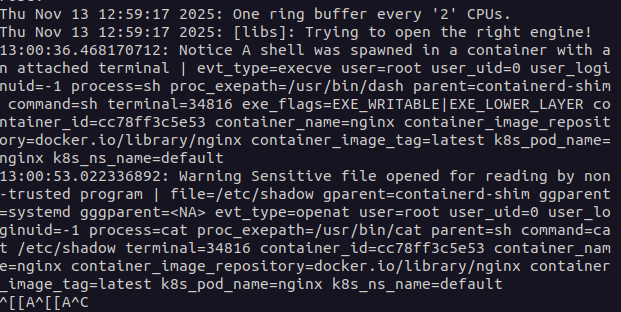
This shows that a pod named nginx was exec’d into and the next log line which was a custom rule shows that the shell tried to access a sensitive file by running a command `cat /etc/passwd`
Integrating Alerts:
Falco alerts can be forwarded to external tools like Slack, Microsoft Teams, or SIEM systems. The Helm chart provides built-in flexibility to configure these outputs via Falco Sidekick or direct integrations, ensuring that your team is notified immediately when suspicious activity occurs.
Use Cases:
- Real time threat detection: Detects a wide range of threats, including malware, unauthorized process execution, file exfiltration, and privilege escalation in real time.
- Monitors system calls, file access, and network activity to find malicious patterns, such as a process spawning a shell or accessing sensitive files.
- Deep container visibility: Provides insight into all byte level data written to files, network connections, and pipes within containers.
- Auditing infrastructure activity: Logs a wide range of system events to create a history of activity for later analysis and incident investigation.
Conclusion:
Falco delivers real-time runtime security for Kubernetes, catching threats that static scanners and admission controllers often miss. By deploying Falco, defining custom rules, and integrating alerting systems, you gain complete visibility into suspicious container activity from unexpected shell executions to unauthorized file modifications.
Alerts generated by Falco can be seamlessly forwarded to tools like Slack or Microsoft Teams, ensuring your team is notified immediately. The Falco Helm chart provides built-in flexibility to configure these integrations, making it easy to incorporate into existing DevSecOps workflows.
With its combination of proactive monitoring, customizable rules, and alerting capabilities, Falco is an indispensable tool for DevSecOps teams looking to enforce strong security without compromising agility or developer velocity.