

Introduction
In modern software development, deploying applications to Kubernetes clusters can be complex and error-prone. Argo CD addresses these challenges by providing a declarative, GitOps-based continuous delivery tool that automates application deployment and lifecycle management.
What is Argo CD?
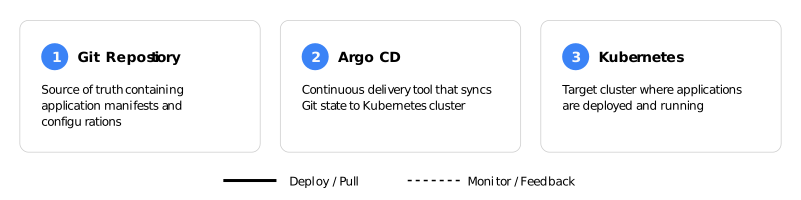
Argo CD is a declarative, GitOps continuous delivery tool for Kubernetes. It monitors your Git repositories and automatically synchronizes the desired application state defined in Git with the actual state running in your Kubernetes clusters. Essentially, it treats Git as the single source of truth for your application configurations.
Why Use Argo CD?
1. GitOps Workflow
Argo CD implements GitOps principles, meaning all your application configurations are version-controlled in Git. This provides a complete audit trail of who changed what and when.
2. Automated Synchronization
It continuously monitors your Git repository and automatically deploys changes to your Kubernetes cluster, eliminating manual kubectl commands and reducing human error.
3. Declarative Setup
You define the desired state of your applications in Git, and Argo CD ensures that the actual state matches it. If someone manually changes something in the cluster, Argo CD detects the drift and can automatically correct it.
4. Multi-Cluster Management
Manage deployments across multiple Kubernetes clusters from a single Argo CD instance, making it ideal for organizations with development, staging, and production environments.
Key Benefits and Advantages
Enhanced Security
- Credentials for Kubernetes clusters are not stored in CI/CD systems
- Access control through Git repository permissions
- Role-based access control (RBAC) for team management
Visibility and Transparency
- Web-based UI shows real-time application status
- Visual representation of resource relationships
- Easy rollback to previous versions with Git history
Disaster Recovery
- Quick recovery from cluster failures
- Complete application state stored in Git
- Reproducible deployments across environments
Developer Productivity
- Developers focus on code, not deployment scripts
- Self-service deployments through Git commits
- Faster feedback loops with automated sync
Consistency
- Standardized deployment process across teams
- Configuration drift detection and correction
- Environment parity through shared manifests
How Argo CD Works: A Practical Example
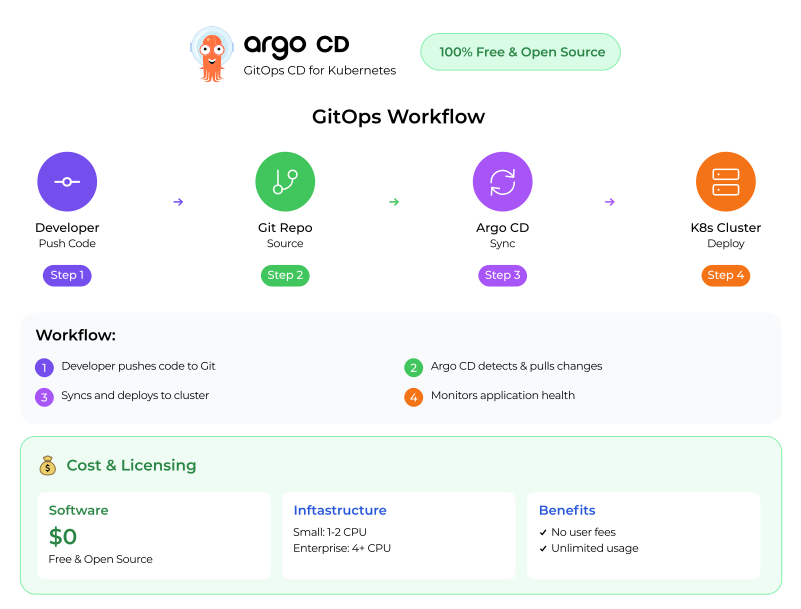
Let’s consider a simple deployment workflow:
- Developer Push: A developer pushes updated Kubernetes manifests to the Git repository.
- Argo CD Detection: Argo CD detects the change in the repository.
- Synchronization: Argo CD pulls the new manifests and applies them to the Kubernetes cluster.
- Monitoring: Argo CD continuously monitors the application health and reports status.
Getting Started: Installation and Setup
Setting up Argo CD is straightforward and can be completed in minutes. Here’s a step-by-step guide
Prerequisites
Before installing Argo CD, ensure you have:
- A running Kubernetes cluster (v1.21 or higher)
- kubectl command-line tool installed and configured
- Admin access to your Kubernetes cluster
Installation Steps
Step 1: Create Argo CD Namespace
kubectl create namespace argocdStep 2: Install Argo CD
kubectl apply -n argocd -f https://raw.githubusercontent.com/argoproj/argo-cd/stable/manifests/install.yamlThis command installs all Argo CD components including the API server, repository server, and application controller.
Step 3: Verify Installation
kubectl get pods -n argocd Wait until all pods are in “Running” status. This may take a few minutes.
Step 4: Access Argo CD UI
For local access, expose the Argo CD server:
kubectl port-forward svc/argocd-server -n argocd 8080:443Now access the UI at: https://localhost:8080
Step 5: Get Admin Password
kubectl -n argocd get secret argocd-initial-admin-secret -o jsonpath="{.data.password}" | base64 -dLogin with username: admin and the password retrieved above.
First Application Deployment
Step 1: Connect Your Git Repository
Using the UI or CLI, add your Git repository:
argocd repo add https://github.com/your-username/your-repo.gitStep 2: Create an Application
Create a YAML file (e.g., my-app.yaml):
apiVersion: argoproj.io/v1alpha1
kind: Application
metadata:
  name: my-application
  namespace: argocd
spec:
  project: default
  source:
    repoURL: https://github.com/your-username/your-repo.git
    targetRevision: HEAD
    path: k8s-manifests
  destination:
    server: https://kubernetes.default.svc
    namespace: production
  syncPolicy:
    automated:
      prune: true
      selfHeal: true
Step 3: Deploy the Application
kubectl apply -f my-app.yamlArgo CD will now automatically sync your application from Git to your Kubernetes cluster!
Configuration Best Practices
Enable Auto-Sync: Configure automatic synchronization so changes in Git are automatically deployed:
syncPolicy:
  automated:
    prune: true
    selfHeal: true
Set Up RBAC: Configure role-based access control for team members:
kubectl edit configmap argocd-rbac-cm -n argocdConfigure Notifications: Set up Slack or email notifications for deployment events to keep your team informed.
Use Projects: Organize applications into projects for better access control and resource management.
Use Cases
Continuous Deployment: Automatically deploy applications when code is merged to the main branch, enabling true continuous deployment pipelines.
Environment Promotion: Promote applications from development to staging to production by updating Git branches or directories.
Configuration Management: Manage application configurations across multiple environments using overlays and parameter substitution.
Infrastructure as Code: Deploy not just applications but also infrastructure components like ingress controllers, monitoring tools, and databases.
Conclusion
Argo CD transforms Kubernetes deployments by implementing GitOps principles. It provides automation, visibility, and reliability that traditional deployment methods lack. For teams managing Kubernetes applications, Argo CD reduces complexity, increases deployment frequency, and improves overall system reliability.
Whether you’re managing a single cluster or dozens of them, Argo CD’s declarative approach ensures your deployments are consistent, auditable, and repeatable. By making Git the source of truth, it brings the same version control benefits that developers enjoy for code to the entire application lifecycle.
Ready to get started
Visit the official Argo CD documentation to begin implementing GitOps in your Kubernetes workflows.