

Serverless architectures have revolutionized how engineering teams build and scale applications. By abstracting servers, orchestrating infrastructure, and providing on-demand execution, cloud providers enable teams to focus on business logic rather than provisioning, patching, or capacity planning.
Among all serverless tooling, Serverless Framework is one of the most widely adopted open-source toolchains for building, deploying, and managing serverless applications on AWS, Azure, Google Cloud, and more.
This blog provides a deeply technical overview tailored for DevOps engineers, SREs, and backend developers who want to fully understand how Serverless Framework works, how it deploys infrastructure, and how to use it effectively in production environments.

What Is Serverless Framework?
Serverless Framework is an Infrastructure-as-Code (IaC) tool focused on serverless architectures. It acts as a high-level abstraction over cloud-native services such as:
- AWS Lambda
- Azure Functions
- Google Cloud Functions
- AWS API Gateway
- DynamoDB / S3 / SQS / SNS
- EventBridge
- CloudWatch
- And dozens of other services
At its core, Serverless Framework consists of:
1. CLI (serverless or sls)
You run commands such as sls deploy, sls package and sls remove.
2. Configuration File (serverless.yml)
Defines functions, triggers, IAM roles, and cloud resources.
3. Plugins
Extend functionality (e.g., serverless-offline, prune, webpack bundling, dashboard monitoring).
4. Providers
Cloud-specific deployments (AWS, GCP, Azure, AliCloud, Tencent Cloud)
How Serverless Framework Works Internally (AWS Focus)
When you run:
sls deployHere’s the exact workflow:
Step 1: Parse serverless.yml
Serverless merges:
- serverless.yml
- CLI flags
- Variables from SSM, Secrets Manager, etc.
Step 2: Generate CloudFormation Template (AWS)
Serverless translates your configuration into:
- Lambda resources
- IAM roles
- API Gateway endpoints
- CloudWatch log groups
- SQS/SNS/EventBridge triggers
- S3 buckets
- VPC configurations
- Anything else you define under resources:
Example of what Serverless generates behind the scenes:
HelloLambdaFunction:
  Type: AWS::Lambda::Function
  Properties:
    Handler: handler.hello
    Runtime: nodejs20.x
    Timeout: 30
    Role: ...
Serverless automates all these details so you don’t write CloudFormation manually.
Step 3: Package Functions
Serverless:
- Zips your code
- Includes dependencies
- Applies exclusions defined in .slsignore
- Creates an artifact under .serverless/hello.zip
Step 4: Uploads to S3
Artifacts and the CloudFormation template are uploaded to an auto-generated S3 bucket.
Step 5: Deploys CloudFormation Stack
AWS updates the stack using ChangeSets.
This means deployments are:
- transactional
- reversible
- fully IaC-driven
Step 6: Outputs Endpoints & Resources
After deployment, Serverless prints:
- API Gateway URL
- Lambda ARNs
- CloudWatch log groups
- Any outputs you define
The serverless.yml: A Detailed Breakdown
Here is a detailed, production-grade example:
service: billing-service
frameworkVersion: '3'

provider:
  name: aws
  region: us-east-1
  runtime: nodejs20.x
  stage: prod

  environment:
    TABLE_NAME: billing-records
    LOG_LEVEL: info

  iamRoleStatements:
    - Effect: Allow
      Action:
        - dynamodb:PutItem
        - dynamodb:GetItem
      Resource: arn:aws:dynamodb:us-east-1:*:table/billing-records

functions:
  createBillingRecord:
    handler: src/handler.create
    timeout: 30
    memorySize: 256
    reservedConcurrency: 10
    events:
      - http:
          method: post
          path: /billing

  fetchBillingRecord:
    handler: src/handler.fetch
    events:
      - http:
          method: get
          path: /billing/{id}

resources:
  Resources:
    BillingTable:
      Type: AWS::DynamoDB::Table
      Properties:
        TableName: billing-records
        BillingMode: PAY_PER_REQUEST
        AttributeDefinitions:
          - AttributeName: id
            AttributeType: S
        KeySchema:
          - AttributeName: id
            KeyType: HASH
This single file defines:
- Lambda compute
- API Gateway routes
- IAM role (least privilege)
- DynamoDB table
- Environment variables
- Concurrency controls
- Region & stage
- Complete IaC for the service
Real-World Use Cases
- Serverless REST APIs: Lambda + API Gateway + DynamoDB.
- Data Processing Pipelines: Run serverless functions to process large datasets or handle streaming data.
- Event-Driven Microservices: Use EventBridge or SQS to build decoupled services.
- AI/ML Workflows: Invoke Bedrock, SageMaker, or external APIs.
- Scheduled Jobs: Run cron-like scheduled functions using CloudWatch Events.
events:
  - schedule: cron(0/5 * * * ? *)
3 benefits to using a Serverless Architecture
- Lower cost when factoring in the reduced need for DevOps staff to set-up and maintain infrastructure over time and the pay per usage billing meaning low traffic periods can cost $0 per hour.
- Development velocity increases drastically since it is a lot easier to put solutions together and deploy it into production
- Increased up time since the cloud manages all the services for you as well as manages better under unexpected load.
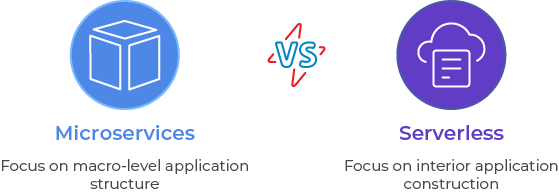
Serverless Architecture vs Microservices
This is a false dichotomy. Microservices speaks to how to structure your application at a macro level whereas Serverless describes the interior construction of the application. A Serverless application can use Microservices principles (and is often the recommended approach) and it might not. The micro services in a Microservices architecture may all be built using Serverless, or only some or none.